
Microsoft news
Task Chat: conversations built into Planner tasks
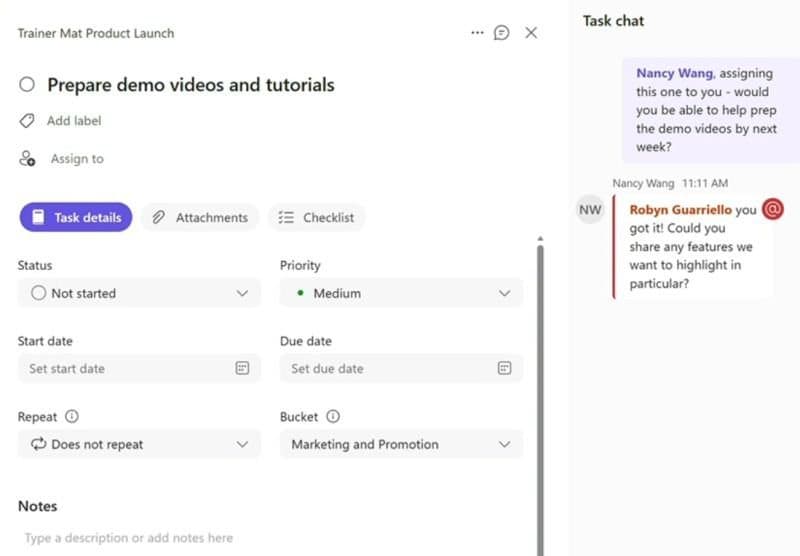
One of the new features Microsoft presented at Ignite is Task Chat: a dedicated conversation inside each Planner task, integrated with Microsoft Teams.
The conversation lives inside the task
Each task gets its own conversation. This avoids:
- searching for old messages in Teams;
- losing the context of what was agreed;
- discussions scattered across several channels;
- decisions lost in different conversations.
Comments, alignments and decisions stay linked to the task, next to status, dates, priority, attachments, checklist and assignees.
How it works day to day
- You create the task and assign an owner.
- Planner opens a conversation for that task.
- The owner replies right there.
- Everything is recorded in the right place.
What changes for PMOs, IT and project teams
- Centralized communication.
- Organized history.
- Less duplicated information.
- Traceable decisions.
Integration with Teams and Copilot
Copilot can read the Task Chat context to generate updates, point out blockers and suggest next steps.
See how ProjectSA does it: Support
Frequently asked questions
What is Planner's Task Chat?
It is a dedicated conversation inside each Planner task, integrated with Microsoft Teams.
Where are Task Chat messages stored?
In the task itself, together with status, dates, priority, attachments, checklist and assignees.
Does Copilot use Task Chat?
Yes. According to Microsoft, Copilot can read the conversation to generate updates, point out blockers and suggest next steps.


